Fault
Inverter welder powers on but no output
A symptom-first guide for welders where the fan or display works but welding output is missing.
This page has a specific ZX7 / WS no-output role
This page handles the general inverter-welder no-output symptom. It should point to ZX7 / WS, ZX7-250 and no-OCV pages when the evidence matches.
Related ZX7 / WS no-output pages
ZX7 no-output content is separated by scope: broad protection symptom, generic inverter no-output, ZX7-250 specific symptom, no-OCV subtopic and the structured ZX7 / WS diagnostic route.
What this symptom usually means
When an inverter welder powers on but has no welding output, the machine is not necessarily dead. The fan may run, the display may light, and the auxiliary supply may be partly working, but the power conversion chain can still be blocked at the PWM controller, shutdown circuit, driver stage, inverter stage, secondary rectifier, output inductor, shunt or feedback loop.
Complete diagnostic sequence
Why technicians should not replace IGBTs first
A no-output welder often fails because the control board is deliberately not enabling the driver stage. Replacing MOSFETs or IGBTs without checking PWM, shutdown and drive waveforms may waste parts or immediately destroy the new devices. The safer path is to confirm auxiliary supply, control IC status and driver waveform before energizing the full DC bus.
Expected checks
| Check | Normal / Expected | Abnormal Meaning |
|---|---|---|
| DC bus | Present and appropriate for input | Input rectifier, NTC, relay or dual-voltage stage fault |
| 24V rail | Stable auxiliary voltage | Auxiliary supply or shorted load fault |
| PWM IC VCC | Stable supply | Control chip not starting |
| Shutdown/protect input | Inactive during normal welding | Protection, VRD, optocoupler or feedback fault |
| Gate-drive waveform | Balanced waveform present | Driver transistor/transformer or PWM fault |
| Secondary rectifier | Not shorted/open | Output side fault or no current despite switching |
SG3525-style control board branch
If the machine uses an SG3525 / SG3525A control module, treat no-output as a control evidence problem before moving to power-device replacement. Confirm SG3525 supply, 5.1V reference, RT/CT oscillator, soft-start ramp, shutdown state and A/B outputs. If A/B outputs exist but the driver transformer has no usable waveform, move to driver transistors, transformer primary and gate-drive branch checks.
Common root causes
- KA3843/KA3845 auxiliary power supply has no stable 24V.
- UC3846 shutdown or peak-current feedback path blocks PWM output.
- SG3525 soft-start, shutdown or compensation path holds the control board off.
- Driver transistors, gate resistors or pulse transformer are damaged.
- MOSFET/IGBT power devices are shorted or not being driven.
- Secondary fast-recovery diodes, output inductor or shunt feedback path is abnormal.
PWM, feedback and protection evidence before board replacement
For no-output and current-not-adjustable faults, separate the command signal, oscillator, PWM output, shutdown/protection state and gate-drive transfer before replacing the main board or IGBT module. A fan or display only proves auxiliary power; it does not prove PWM permission.
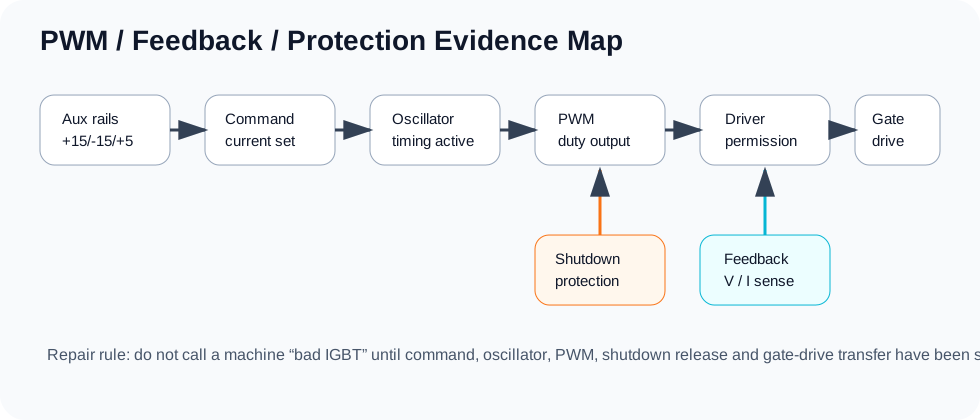
Use this chain in repair records: VCC present → reference present → oscillator present → shutdown released → PWM output present → driver stage receives pulse → gate branches are symmetric → real current is confirmed under staged power-up.
PWM, feedback and protection evidence before board replacement
For no-output and current-not-adjustable faults, separate the command signal, oscillator, PWM output, shutdown/protection state and gate-drive transfer before replacing the main board or IGBT module. A fan or display only proves auxiliary power; it does not prove PWM permission.
Use this chain in repair records: VCC present → reference present → oscillator present → shutdown released → PWM output present → driver stage receives pulse → gate branches are symmetric → real current is confirmed under staged power-up.