Board reference
ZX7-250 Power Board, Bridge Rectifier, Capacitor and Relay Checks
A WelderData power-board reference for ZX7-250 machines where the breaker trips, the lamp limiter stays bright, the fan runs with no output, the relay path is uncertain or the high-voltage DC bus does not reach the inverter board.
Database summary
This board record treats the ZX7-250 input section as a chain: AC input, bridge rectifier packages, capacitor storage, relay or boost routing, high-voltage DC bus output, auxiliary supply rails and the downstream inverter/output stage. A machine can show some low-voltage signs of life while the main DC bus path is still missing or unsafe.
In this platform the input bridge area may use two bridge packages in a combined rectifier arrangement. The relay state depends on the input-voltage mode. Under the 220V mode, two relays may be expected to pull in for the boost path; in the 380V mode, the relay behavior can differ. The repair target is not the relay alone. The technician must check the bridge, capacitor bank, relay contacts, relay drive, DC bus voltage and output connector as one power-board system.
Power-board and output-stage map
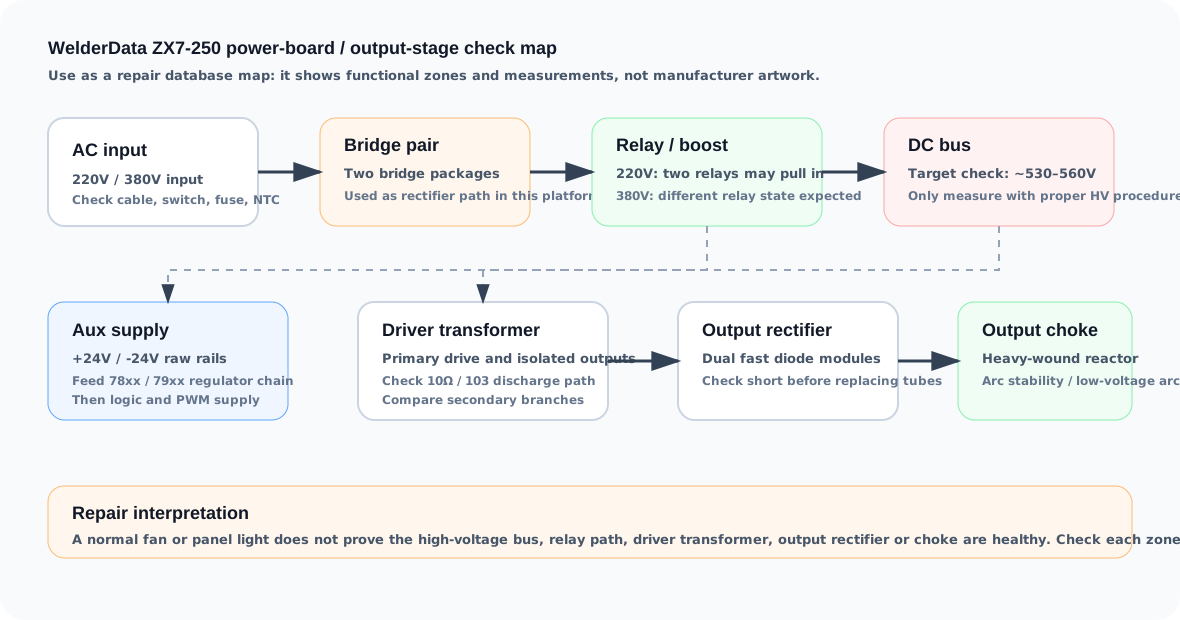
What to check before blaming the control board
Power-board repair sequence
- Disconnect input power and discharge all bus capacitors before resistance or diode-mode measurements.
- Check input wiring, switch, fuse and NTC path before assuming a board-level semiconductor failure.
- Measure the bridge rectifier packages in diode mode and look for shorted AC-to-DC paths.
- Inspect the capacitor bank for bulging, leakage, bad solder and abnormal bus resistance.
- Verify relay coil drive and relay contact continuity. A good relay click is not enough; confirm the contact path.
- Only after the bridge, capacitor and relay path behave normally, measure the DC bus with a safe high-voltage setup.
- If the bus is present but output is still missing, move to the driver board, output rectifiers and protection feedback pages.