Fault
ZX7-250 Fault Light On and No Welding Output: Protection, Upper Board and Secondary Rectifier Checks
A ZX7-250 diagnostic page for machines where the fan runs, the fault indicator is on, and there is no welding output.
This page has a specific ZX7 / WS no-output role
This page remains ZX7-250 specific. It should route users to the broader ZX7 / WS structured diagnostic for board-family reasoning.
Related ZX7 / WS no-output pages
ZX7 no-output content is separated by scope: broad protection symptom, generic inverter no-output, ZX7-250 specific symptom, no-OCV subtopic and the structured ZX7 / WS diagnostic route.
How this fault branch is different
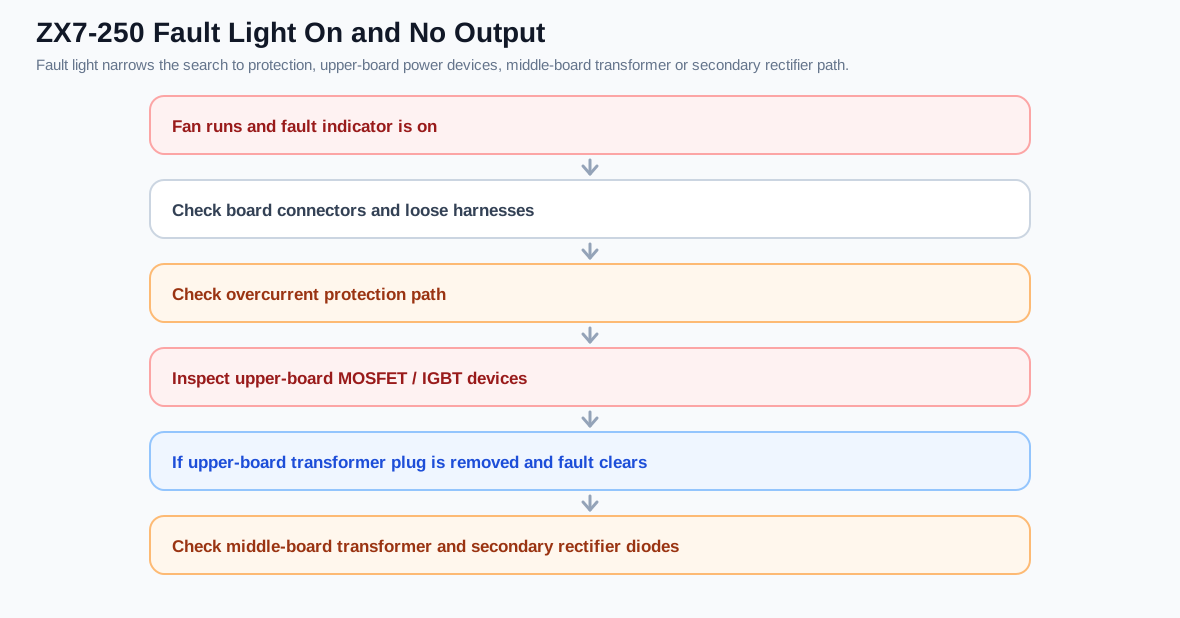
When the fault indicator is on, the machine is telling the technician that a protection path is active or a protected stage is abnormal. This branch is different from fan-runs/no-output with the fault light off. The repair direction should include connectors, overcurrent feedback, upper-board power devices, the middle-board transformer and secondary rectifier devices.
Protection-flow diagram
Diagnostic table
| Check | Expected result | Fault meaning |
|---|---|---|
| Board connectors | Firm and not oxidized | Loose connector can create false protection or missing drive |
| Overcurrent feedback | Not latched during idle | Current transformer or feedback circuit may be driving protection |
| Upper-board MOSFET/IGBT | No shorted power devices | Damaged power devices can trigger protection |
| Driver board zener path | No shorted clamp components | A failed 5.1V zener or gate clamp can follow power-device damage |
| Middle-board transformer plug test | Fault may clear when isolated | Then inspect middle-board transformer or secondary rectifier |
| Secondary rectifier diodes | Not shorted/open | Shorted rectifier can reflect load back to inverter |
Why the plug isolation test matters
One useful repair branch is to isolate the upper-board main transformer supply path. If the fault light no longer appears after the related plug is removed, the problem may not be only in the control board. The middle-board transformer or the secondary rectifier path can be responsible. This prevents a technician from repeatedly replacing power devices while ignoring a downstream short.
Recommended sequence
- Confirm the fault light behavior before opening the machine.
- Inspect connectors and previous repair marks.
- Check upper-board power devices for short circuit.
- Check the driver clamp parts and small zener/protection parts associated with the failed branch.
- Use isolation testing to separate upper-board inverter faults from middle-board transformer and secondary rectifier faults.
- Repair the secondary or driver cause before reinstalling new power devices.